Showing posts with label iPad. Show all posts

Tuesday, April 23, 2013

Sharing files across devices

I am loving Instashare for transferring files, videos and photos between iOS devices such as an iPad and iPhone.   It works like Airdrop on the Mac by enabling the transfer of files via local wi-fi or Bluetooth. There is a Mac beta version which works well to  instantly share files between my Mac, iPad and iPhone. Currently an app for iOS Devices, the developers are working on an android as well as Windows version.

Instashare would be great for sharing files between devices the classroom.

Instashare is free, and you can upgrade to a ad-free version for around $1.30.


Monday, April 1, 2013

Learning@Schools - Augmented Reality Presentation

This week I am lucky enough to be presenting at the first ever Learning@Schools Roadshow.  Kicking off in Whangarei on Wednesday 3rd April with an amazing programme.

One of my presentations is 'QR Codes and Augmented Reality'

The iPad comes alive with Augmented Reality


This workshop will focus on the use of an iPad to explore QR Codes and Augmented Reality (AR). 
The session will focus on how to effectively use and integrate QR codes throughout the curriculum and school community. You will see how Augmented Reality has engaged, enhanced and empowered students to write and create books using a variety of different iPad apps.

I have enjoyed introducing students and teachers to the concept of augmented reality and have been exploring how this can be used to support teaching and learning.  We have had heaps of fun trying out different apps and thinking about how these can be used.  To date, the biggest success has been in engaging students in writing digital stories using augmented reality pictures.  All you need is your IMAGINATION!  Here is the list of apps I am sharing within this workshop.  Some of these apps do require markers to be printed off.


Imag-N-O-Tron - The Fantastic Flying Books of Mr Morris Lessmore


Tour Wrist - not truly augmented reality BUT gives amazing possibilities when you are able to visit historic landmarks and use these pictures as the basis for extending storytelling.

Can you imagine when this is a reality and part of our everyday life?


Monday, October 29, 2012

iBooks 3

The iBooks store has finally 'arrived' in New Zealand.  While the app has always been available,  the purchasing of books was not an option.  This has now changed and while not all publishers have their content with iBooks, there is a good starting range.  There is also a range of self-published books, created with iBooks Authors.  These self-published books include textbooks, recipe books, children's stories etc.

The release of iBooks 3 has seen alignment with iCloud so that your notes, bookmarks and placemark is synced across all your  ios devices.

It is worth browsing the iBooks Store if you haven't already.  You might like to check out the free sample of Life on Earth, a multi-touch interactive book that showcases the future of textbooks.


Thursday, October 4, 2012

MoMA Art Lab iPad App

The children and teaching team at Manaia Kindergarten continue to be an inspiration to me in my role as an Early Years Facilitator. A great ECE blog to check out to see the incredible learning happening. Manaia Kindergarten have had an iPad for sometime now and it is great to see the children working collaboratively using the MoMA Art Lab App to create their artwork. I have just downloaded this app and looking forward to working with it with children.  Check out the You Tube clip below for a quick 'what it's all about':-)


Wednesday, September 26, 2012

Dinosaurs in NZ Classrooms!

Sharon - our Hamilton Early Years Facilitator under attack in Auckland!

I have had heaps of fun exploring the AR Dinopark App with students at different schools throughout Whangarei.  The excitement and buzz is amazing as the dinosaurs crash on into the classroom.  The strategy of taking photos and then using these photos as creative and imaginative writing prompts has proved very successful.  We have used the Pic Collage App to put our stories together.


Check out some of our posts on the Whangarei Primary School blog.  We would LOVE your comments.

Augmented Reality in Room 9

Michael's Triceratops Attack!

Ocieana and Claire's Dinosaur Story

I have recently visited with @AllanahKing in Nelson and she has also had fun with dinosaurs at Appleby School.

Sunday, July 15, 2012

The Amazing Spider-man AR


I have been playing around with augmented reality for a few months.      We are at the beginning of AR possibilities and future developments will be exciting.  As much fun as I have had with it, I have wondered how it could be used in the classroom.

While at the Slide2Learn conference in July, I attended a workshop on AR facilitated by Nathan Jones.  Jones talked about how he uses AR in the classroom with his students.  Using AR to spark ideas for story-writing was one of the ideas he shared.

The Amazing Spider-man AR is a great app for Spiderman lovers.   By downloading the free app from the App store, and printing the series of free markers from the site, users can shoot spiderman's web, swing across buildings, capture baddies and climb brick walls.  Lots of ideas for story starters here.  I can see that reluctant writers could be drawn in to story writing this way.


The iPad as a Tool for Education


Longfield Academy in the UK have implemented an iPad programme. This report, published by Naace in July 2012, outlines how the iPads have been used for teaching and learning in the two terms since the programme started.

 The Executive summary is as follows:

"This study, one of the most extensive yet regarding the use of tablet devices finds that with the majority of pupils at the school now having iPads there has been a significant and very positive impact on learning together with further significant and still developing changes in pedagogy. In particular it was found that:
  • The overwhelming majority of teachers regularly use iPads in their teaching
  • iPad use is particularly strong in English, Maths and Science
  • There is high demand from students for iPad use to be extended further
  • Teachers have identified significant benefits for their workload and have also
    identified cost savings
  • Use of the iPads is increasingly being developed for homework and beyond
    school activities
  • Students are more motivated when using iPads
  • The quality and standard of pupil work and progress is rising
  • Both staff and student feel they can work more effectively with iPads
  • Levels of collaborative working have improved
  • Appropriate use of Apps aids learning
  • All find the iPad easy to use
  • Minor technical issues have arisen, often due to user error, but are readily dealt
    with
  • Effective project management has been critical to the success of this development.
    The outcomes at Longfield clearly demonstrate the value of the iPad as an educational tool and the role that it can play in learning and teaching." (p. 4) 

Monday, April 23, 2012

Lego Super Hero Movie Maker


This Lego app - the Super Hero Movie Maker -  uses stop motion to record movies.  This app is simple to use and it takes no time to create a movie.  It works well on all iDevices and best of all it is free.

Users can select from a range of title pages, soundtracks and filters, all with a super hero theme.

Check out a quick movie made in less than two minutes by one of my children (I am sure the storyline will get better with practice :-)


YouTube Video

Postnote:  After making the original movie above and showing it to others , adiscussion was had about clarity of photos and the need for the story to flow with two children working together for the next version .......... will be interesting to see where this develops.

Also check out the animation from Room 7 at Normandale School where they have started using the Lego Super Hero Movie Maker.

- Posted using BlogPress from my iPad
Location:Lego Movie

Monday, March 12, 2012

Te Pataka a Milly me Molly


Te Pataka a Milly me Molly is a collection of the Milly and Molly stories in Te Reo Maori.  Once the app is downloaded, users can select any number of the 30 books to download to their iDevice.  Not only do the books have delightful illustrations and narration in Maori, they can be read in a number of ways.  Options for reading include user reading, touching each word to hear how it sounds or have the book automatically read from beginning to end.  As each word is read, it appears larger on the screen so the child can follow along with the story.  The collection of stories also have the added option of being able to record yourself reading the story - particularly good if you want to practice your reo, or to have a family member read the story to the child (great option for when special family members are not always nearby to read everyday to the child).

I have found it difficult to access the books when not connected online so I would recommend that you be connected online to read each book.


-


Posted using BlogPress from my iPad

Thursday, March 8, 2012

My Story

My Story is a very reasonably priced ($1.99) app for creating books easily.  Books can be shared via email or saved as an iBook (a free app).  Once saved an an iBook - your story can be read on your iPad anywhere, anytime:-)

I love the fact that you can import your own photos, draw your own pictures, add text and record your voice.  It is very simple to use and has very clear symbols that children can follow with ease.

A great digital storytelling app for all ages:-)
Step 1 - Simply tap 'My Story' to give your story a title

Step 2 - Create your cover page you can tap the paintbrush symbol to open your options for painting or tap the photo symbol to see your options for taking a photo or adding a photo from your collection.  To change colours - simply tap the colour you would like to choose - scroll along to see new colours...

Step 3 - Add text to your cover page by clicking on the bottom right arrow - It will open up this screen, simply tap the 'ABC' to begin typing...  Once you have finished click the arrow again to go back to your cover page.  You can then click 'cover page' in the bottom left hand corner...

 
Step 4 - To add another page simply click the page symbol in the top right hand corner and continue to add pages to your story...

If you want to add your voice to your pages - simply click on the red microphone symbol...

Step 5 - When your story is finished you have the option of reading it or sharing it....

Step 6 - Click on share and choose how you would like to do so - HAVE FUN CREATING!


UPDATE: The publishers are working on a print function and in the meantime have some video instructions of how to print.

Wednesday, March 7, 2012

Pic collage

Pic collage is a free app that makes it easy to turn your photos into a collage which can be shared via email, Facebook or twitter.  Photos can either be taken using the iPad or iPhone Camera, or imported from the media library.  Once photos on the the screen, they can be edited, clipped, resized, moved around, set as the background or rotated.  A range of options include selecting from a range of backgrounds, adding text and stickers.  The photos can be moved in front or behind other photos with just a simple tap.  This is a great app that is easy to use for all ages.  Download and give it a try today.


- Posted using BlogPress from my iPad

Tuesday, March 6, 2012

The Elements


Theodore Gray's The Elements is a beautifully detail and informative eBook on the periodic table.  The elements appear on the home screen.  Tapping an element enlarges it so it appears on the entire screen rotating 360degrees.  The main facts about the element such as it's weight, melting point and density appear to the side of the screen.  The next page of the eBook contains detailed information on the element, as well as more clear photographs. All the elements shown can be rotated by touch.  At anytime, the user can return to the home screen.  This app also has the Lehrer song 'The Elements' so you can sing along while watching all the elements go by!

The Elements is a pricey app - about NZD18 - but if you want to learn more about the periodic table, then this app is one of the better ones I have found,  the visuals are stunning.


-


'There's antimonyarsenicaluminumselenium,
And hydrogen and oxygen and nitrogen and rhenium,.......'
 from Lehrer, The Elements Lyrics


Posted using BlogPress from my iPad

Monday, March 5, 2012

Radio NZ

One of my colleagues, Justine Mason, shared this fab free app with me today. The Radio NZ app not only lets you listen to Radio NZ programmes live, it allows you to select and listen to content from previous shows. If you miss an inteview or report, add it to your playlist and listen when the time is convenient.

The app works on iPad, iPhone and iTouch.


-


Posted using BlogPress from my iPad

Sunday, February 26, 2012

Bug builder - paint and decorate

This app has been designed for very young children. The child selects a shape for their bug and decorates it by choosing colors and drawing. Tapping the screen brings the bug to life as feet, feelers, legs etc are added to it and the bug moves around the screen.  Taking a photo is an option before returning to the main screen to start again.


Posted using BlogPress from my iPad

Thursday, February 9, 2012

Pirate Scribblebeard's Treasure


I love finding apps that encourage children's imagination and ideas. Pirate Scribblebeard's Treasure is an app designed to foster creativity and playful exploration, demonstrating the power of an iPad as a tool for learning. Based around the theme of pirates, pirates Oscar and Josephine take children on an adventure. Each page children are gently guided through the theme of the story creating their own illustrations that come 'alive' through animation. The story can be read and recreated many times.


Check out the developer's YouTube video:


This app is currently free through iTunes so give it a go and create your own pirate treasure!

- Posted using BlogPress from my iPad

Tuesday, February 7, 2012

Elmo explores ABCs for the iPad


Using Sesame Street's lovable Elmo, this App encourages young children to explore literacy through letters and sounds in the form of  games, videos, songs and more.

The main section of this game is based on levels, so that the letter must be traced with a finger before the next stage appears.   Children trace both the upper case and lower case letter that they have selected, then they can draw their own, hear the sounds of each letter, watch short video clips related to that letter and find hidden objects.  There are also alphabet songs, and letter matching games.

For adults who want the option, there is a tracking section that records how long the game is played, the child's favourite letter and favourite activity.

What I particularly like about this app is that it can be personalised to include words, photos and videos of the important things in children's lives, such as pets, family members, favourite toys, and in this case, even workplace!


There is lots to explore in this app that is filled with colour, sound and clear images.  Give the free lite version a trial today!


Tuesday, January 24, 2012

Scrabble Anyone?

I love a good board game over summer with the family:-) My children are now teenagers and it is much harder to entice them into playing with me! At the end of last year a friend of mine was playing scrabble, on his iPhone, against his partner who was then living in Australia. This intrigued me, how cool that they could play a game together from different countries! Since then, I have utilised good old google and you tube to find out more! I am yet to get together with my family to give it a try and look forward to a weekend at the beach over Waitangi weekend to entice them. I am also going to introduce this concept to the teachers at Whangarei Primary and suggest children in different classes trial playing games of scrabble together:-) Would love to hear from anyone who has tried scrabble on the iPad/iPod out:-)

Tuesday, November 22, 2011

Strip Design for Storytelling

I have been using Strip Design with the children at Whangarei Primary both on iPod touches and iPads.  This has proved a very successful tool for sharing digital photos.  The junior children have explored this app by taking their own photos around the school, adding them to strip design and writing small captions with some of the photos.  The senior children are flying as they add frames, text, colour and different effects to personalise their story.  Endless opportunties for creativity in their storytelling.  Here are a few step by step guides to using Strip Design...

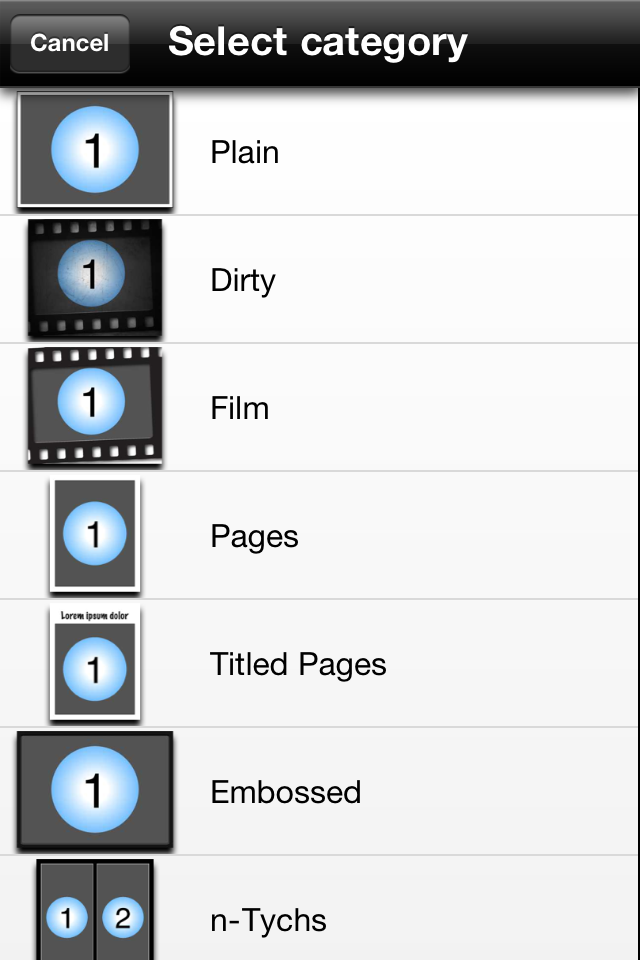
Step 1 - Choose your style

Step 2 - Choose your template and number of photos you wish to add

Step 3 - Click on add your photos
Step 4 - Choose photos from photo album, facebook etc or use the camera to take as you go 
Step 5 - Have a play with your photos - add frames etc

An example of adding, changing style and colour of frame

Step 6 - Once you have your frames sorted you are able to choose text etc for title and words

An example of adding title - simply double click on words to change them - easy as:-) 
Step 7 - When done click Share

From here to can email or save to Photo Album

You are also able to open as PDF and if you scroll down... share via facebook/flickr and twitter

My very basic finished product!  Thanks to my Oxfam Adventure Angels team for sharing photos:-)